 I think that anyone who is serious about learning Chinese should learn to write characters. This isn’t necessarily because you will be required to write a lot by hand (that almost never happens to me), but because it will teach you a lot about how characters work. This will help you recognise characters as well, which is truly essential once you get beyond everyday conversations.
I can (and probably will) write several articles about writing characters, discussing questions like when you should start, how many and which characters you should focus on first. I think all these questions are up for debate and in general, I think Chinese second language education today is focusing way too much on writing characters, routinely requiring students to be able to write all characters by hand (this isn’t really necessary).
Different ways of writing characters
Let’s just assume that we have decided to learn to write characters. You could be a beginner working through the first words in a textbook or an advanced learner like myself expanding beyond what’s actually necessary to know.
How should you write the characters? I don’t mean what the strokes should look like or in what order they should be, I mean how do you practically go about writing them?
There are many ways of writing characters, all with their pros and cons. Below I’m going to discuss some of them. I will discuss all of them in terms of their major advantages, how close they are to actual handwriting, how easy it is to cheat and some other factors I find interesting.
Seven ways of practising Chinese characters
Here we go:
-
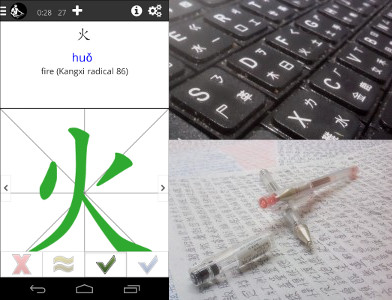
Writing on paper – This is the most obvious way of writing and has been around for a while. The main advantage with this method is that if being able to write Chinese on paper is your goal, it makes sense to practise just that. Compare this with if you want to learn more about the structure and composition of characters when it doesn’t really matter what your strokes look like. Of course, you need paper and pencil to do this, so it’s a bit inconvenient. Unless you have a teacher to check, you also don’t know if your writing is good or not. Still, it’s hard to cheat with this method, if you don’t know how to write something, it will be quite obvious, at least for yourself.
-
Writing with your finger – This is the natural extension of the above method to be used whenever you don’t have paper and pencil around. For some people this becomes the main method, especially when combined with spaced repetition software. You skip the paper and pencil entirely and just write with your index finger on your palm, a flat surface or even in the air. This is obviously more practical because you always have your index finger with you (hopefully). The drawback is that you don’t see the result, which comes with two problems. First, you don’t practise the actual strokes and your handwriting will probably be very ugly if you only practise this way. Second, it’s easier to cheat by being too quick and just saying to yourself that you actually knew that character. If you made a minor mistake, you’re less likely to find it out, too, even if it’s an honest mistake.
-
Writing in your mind – This is the next step in the abstraction process and it works even if your nemesis captures you and cuts your hands off. Simply imagine writing the character on the canvas of your mind. If you’re not very familiar with character components, you might have to do this stroke by stroke, but as you learn more about characters, it works best with just imagining the different components being put into place. 禾, 火 makes 秋, add 心 and you get 愁. Since all these components are common, imagining the writing of this character is pretty easy. The downside with this method is that you’re not actually writing anything, so this helps you remember the composition of the character, but it doesn’t help you actually write it. I’d say this is very good if your handwriting is already acceptable and your main goal is to expand your vocabulary. The method is very quick and it’s probably the one I’ve used the most over the years.
-
Writing on screen without feedback – There are several programs for mobile phones and computers that allow you to write either directly on a touch screen or by using a stylus or writing tablet of some kind. Most of these programs don’t offer you any feedback, so in a sense, it’s just a very expensive kind of paper and pencil approach. However, this is not entirely true, because writing on the screen allows more direct comparisons to model characters and will thus improve the chances of spotting errors. A smart phone is also something most people carry around all the time, which isn’t the case with paper and pencil, so I think these programs are quite good. The most common example of this is Pleco, which offers on-screen writing when reviewing characters. The disadvantages are mostly the same as for paper and pencil.
-
Writing on screen with feedback – This is an approach that has only been around for a few years and the only program I know that does this well is Skritter. I don’t say this because I’m a part of the Skritter team or because I like Skritter in general, I simply haven’t seen any other program that can recognise your strokes one by one and offer feedback on stroke order, stroke placement and even stroke direction (you wrote that backwards). The advantage here is obvious, it gives you feedback on your writing, which makes it both more fun and more effective as a learning method. The downsides are that it costs money. This is by far the best alternative to maintain writing ability, save for having a teacher looking over your shoulder all the time, correcting your writing, but that’s bound to be prohibitively expensive and not very practical.
-
No writing, just looking – This isn’t a method as such, but it’s something many students, including myself, sometimes revert to when too tired. Instead of actively checking if we can write a character, we just look at the answer and try to answer the question: “Would I have been able to write this if asked to,?” The problem with this approach is that your answer is likely to be inaccurate. It’s extremely hard to determine if you knew something after seeing the answer, so you’re likely to overestimate your ability to write the character. Don’t do this! This method has no advantages and it’s only mentioned here so that I can point out that if you want to remember the character, simply looking at it isn’t enough, you need to actively process how the character is structured and written. Use method #3 above instead.
-
Only reading and typing – Many native speakers mostly read and type Chinese rather than write it by hand. Still, we shouldn’t compare ourselves with native speakers. They’ve had a lifetime to practise Chinese characters and even if they don’t practise much writing actively, they can still write most characters. There will of course be exceptions, native speakers forget characters all the time, but that doesn’t mean that they can’t write Chinese by hand if asked to. Even though I haven’t seen any research on this, my own experience tells me that as second language learners, simply reading and typing is not enough, you have to combine this with at least some writing practise. I read 25 books in Chinese last year and probably typed a few hundred pages of text, but even that isn’t enough, I need about 20 minutes per day to maintain and expand my handwritten vocabulary.
The best way of writing Chinese characters by hand
I think the first five methods mention above all work pretty well, but they yield slightly different results and demand different things from you as a learner. It’s easy to cheat with some methods, but if you’re vigilant and strict when grading yourself, this isn’t a big problem. Some methods are less convenient than others, but that also depends on habits and routines.
I personally use mental writing and Skritter the most. I use mental writing because it’s really quick and I feel that I already know how to write the components, I just need to remember how they fit together to form a character. I use Skritter because it’s fun and because it stops me from cheating when I’m lazy. Thus, they complement each other quite well.
What method(s) do you use?
Tips and tricks for how to learn Chinese directly in your inbox
I've been learning and teaching Chinese for more than a decade. My goal is to help you find a way of learning that works for you. Sign up to my newsletter for a 7-day crash course in how to learn, as well as weekly ideas for how to improve your learning!
18 comments
I’m a total novice so pardon my ignorance if I say something foolish… but as I understand it there is a neuromuscular component to character recognition, something I learned about while reading about character amnesia. What I read is that modern ways of writing characters (e.g. Pinyin input on a smartphone) can lead people to forget characters entirely. This might be incidental given that smartphones are new and most people would have learned using their hands… but if the physical act of writing characters is closely tied to character recognition in the mind I’d imagine some of the more abstract methods you list are much less effective than others. Do you think there’s much of a difference for people just starting to learn Chinese?
I’m not sure if you understand your comment correctly, but it’s true that Chinese people forget to write characters and that this is an increasing problem because of the increased use of computers and phones (and a decreased use of actual handwriting). However, it’s not the case that people read less (they probably read more because of the internet) and people will of course not forget their native language if they keep using it. I find the abstract methods listed here very useful (as I think I mentioned), provided that the goal is to remember the composition rather than being able to write the character beautifully/quickly/effortlessly. If that’s the goal, you really need to write. For beginners, I Suggest staying away from the more abstract methods though, you need corrective feedback, preferably both from a program and a teacher.
It seems I may have mixed up recognition and writing in my original message 🙂 thanks for the clarification!
I rely on pen & paper for my basic practice. Early in my lessons, I got to practice with a teacher’s Chinese writing brush & “magic paper” and enjoyed this so much that I got a couple of brushes and some “magic paper” for my own practice. I don’t know if this actually helps, but at least I find practicing enjoyable. I have also found differences in how pencils and pens feel while I practice. I favor Flair felt tip pens for most of my actual pen practice. These felt tip pens behave more like a writing brush than any other pen or pencil I have tried, minimal pressure is needed to leave a mark (just like a brush) and my results look better.
Mostly ink stick, paper and brush, or occasionally a brush pen.
Olle, I can successfully recognize something like 1000 characters. I’m constantly chatting with native chines speakers and use dictionary when I can’t recognize a character. Also I’m able to choose the correct characters while using pinyin to type.
I’m learning Chinese as a hobby, and not interested in writing in Chinese, but mostly interested in listening, speaking and reading.
So, why should I learn how to write? just to avoid recognition mistakes? or to make myself more confident about the different fonts of the characters? I don’t know if it’s worth it. would be happy to hear your thoughts about it.
I would say one of the main advantages is that your knowledge of characters in general will increase quite a bit. Learning to recognise characters is good, but there’s a lot more to know about a character than that. Also, you might know much less about the character than you think, only being able to recognise it in specific words and so on. Naturally, if you ever decide to live or work in China, it will be quite awkward to not be able to write. Still, if you learn Chinese as a hobby and don’t think not knowing how to write by hand is a problem, I seen no serious problems with not learning it. I wrote more about this here: https://www.hackingchinese.com/is-it-necessary-to-learn-to-write-chinese-characters-by-hand/
OK, thanks for your input.
I hope that I can join the pronunciation challenge with the next group soon, because pronunciation is important to me. Already mailed you before about it.
Thanks for having the Blog!
Yes, don’t worry, you’re on my list! 🙂
I’ve given up on handwriting characters. When I started my studies I was super excited about being able to write in Chinese and spent a lot of time just handwriting characters over and over. Several years down the road when I was studying Chinese in grad school it started to really frustrate me that the instructors put so much emphasis on handwriting. It has to be the least practical language skill and yet I found myself devoting many hours to it each week in order to pass the tests. Now I live in Beijing and happily use a computer for all my writing needs!
That being said, I can’t imagine how I would have learned to read all these characters if I hadn’t gotten used to the way they were formed. So, like you, I agree that it is important to at least start out learning to write by hand.
I never had success with any other method than just writing them out repeatedly.
I use methods 1 and 2. Method 3 is I think a precursor to either 1 or 2, but I don’t usually *just* draw characters in my mind. I think kinetic engagement is an important facet of my learning style, so I will almost always write with pen or finger.
Probably the greatest aid to my learning to write characters is one you don’t specifically mention Olle – I endeavour not to use pinyin input on my smart phone, my default is to use the writing keyboard. If I can’t remember how to write a character, but I can remember the sound, I will flip the keyboard to pinyin input where I will easily recognise the character I want. I’ll just glance at it to refresh my memory, then flip back to the writing input to enter it. I think this is a great method of consolidating my writing.
A couple of other points on learning methods and styles:
I love writing characters and have a graph lined notepad and fancy pens that help me make satisfyingly brush-stroke like characters. I’m confident that taking pleasure in the beauty and form of the characters is central to my learning.
My visual memory is much quicker and more solid than my auditory memory, so I use the strong picture I have of a character to lead the learning of the rest: I say the sound and exaggerated tone over and over in my mind as I write, striving to learn these aspects that I find more difficult whilst I enjoy the writing.
As I first encounter characters I make an actual flash card. By now I have a few thousand little flash cards that I’ve made – I write the character or word large on one side (lovely Japanese Zebra brand felt tip pen) with pinyin and translation on the other side. That way I can drill writing, translating into or out of Mandarin, or tones as I choose. I store the flash cards grouped by topic or part of speech.
I work through the flash cards in a sort of contextually driven spaced repetition method of my own devising – eg, “oh, I’ll no doubt need to discuss pregnancy troubles with a friend so I’ll review parts of the body, illness symptoms and emotions before I see her”!! Flash cards of words I know least well go into a little travel box for review on the train (finger writing), waiting in queues etc.
As I’m a self-directed learner I have the luxury of designing my own syllabus to suit my learning style, but I expect a consideration of learning styles would be useful even for learners who do have to cram lists of words for exams. For example, contextual learning is important for me, so I learn characters by using them in words and sentences. My vocabulary lists (flash cards) amass from conversations that are important to me at work and with friends. This experiential and emotional connection as I learn is part of my learning style, as is my quick visual memory, and my aesthetic enjoyment mentioned earlier. Even my manual “spaced-repetition” method is context driven, so I review frequently used words more often.
I saw in the article that it said that you don’t know any other apps like skritter. I found one I am quite happy with that is similar though it is not as gamey or flashy as skritter. It is Tofulearn. I’m not sure if there is an android version. I use it on my iPhone anyway and like it well enough. And it’s free
Hi! Thanks for the recommendation; I’ll check it out. There are several apps that do handwriting these days (I think it was different just a few years ago). Nowadays, the situation is more complex with several alternatives (some of them free) but with lots of other things to compare and take into account. Another free alternative is Inkstone, if you haven’t tried it already.
How about a non-phonetic input method such as Wubi or Cangjie? A friend recently talked me into learning Cangjie, and I have to say that I immediately noticed a boost in my alertness to how components fit together – beyond what writing by hand did for me. With hand writing, I could just go through the strokes, but if I’m going to hit the right keys for Cangjie, I have to seriously think about how the character is actually put together.
I have considered doing that (learning such a method as a way to review characters more actively when typing), but it’s probably a solution that fits a very, very small number of people. I have learnt additional keyboard layouts (Dvorak) and I would hesitate to spend the massive amounts of time it takes to get good with a new layout. Most students will be much better of spending that time learning characters in some other way. 🙂
I have heard some people (non-native speakers) who learnt Cangjie that they ended up not thinking too much about structure after a while anyway, once a certain character became attached to muscle memory and the pressing of a specific combination of buttons. That seems a bit odd to me, though, it seems like if you can type it, you could slow down the process to figure out which buttons you pressed and thus the composition of the character? I mean, I don’t think how to type the words I’m typing now, but typing them certainly means that I could spell them on paper. Not exactly the same thing, but I don’t see why that wouldn’t apply. Do you have any light to shed on this?
How far are you into learning Cangjie? How’s it going?
I learned Cangjie a few years ago and definitely felt it helped with my reading speed & was useful to “get the pinyin out of my head”, but i ended up not doing much typing after a while. I’ve picked it up again and am typing about 30cpm. I haven’t been doing much writing by hand lately, but definitely can feel the characters flow out much smoother now when I do. It is interesting to hear that your other foreign friends typing cangjie feel they stopped thinking about the structure. Maybe that will happen if I get up to 100cpm.
This is something I’d like to dive deeper into at some point. I don’t know what it’s like to type (relatively) fast with a non-phonetic input system, but it’s conceivable that since each key is not mapped to one specific component, it might be that the link is weak enough that you can type without thinking too much of the structure. Typing in English isn’t a good comparison, maybe, but still relevant. I type fairly fast (top speed a bit above 600 CPM) and it’s not as if I think about how the words are spelt when I type, it’s all muscle memory. Obviously, I need to know how to spell on some level, because that determines the order of the letters, but at some point, it starts being a pattern of keystrokes (almost like a chord) instead of individual movements.
Anyway, the main reason I’m probably never going to invest the time necessary to learn such an input method is that there is another way that is also slow (which it would definitely be for a very long time) and is even better for reviewing how to write by hand, and that is… to write by hand. 🙂 On my phone, when writing shorter emails, messages, search strings, notes, etc.. Communicative handwriting, in other words.
Hey Olle. I swear I read you mention it in an article of yours I read recently, but what are your thoughts on the advantage of writing with a pen or stylus vs. with a finger tip. What I remember from this article is you thought there wasn’t any research on this, but that the difference should be minimal in your estimation at the time.
Kindly,